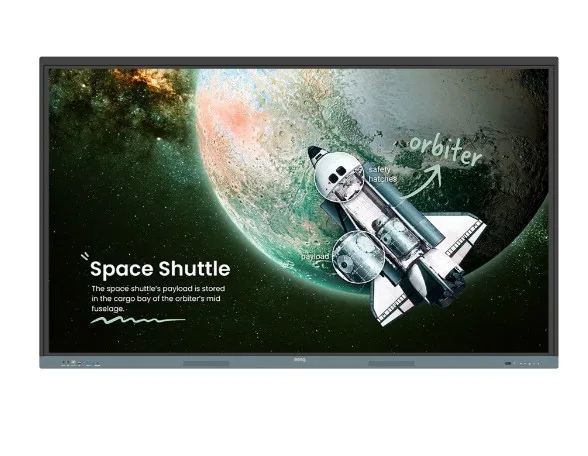
Benq Monitor interaktywny 86 инча RE8604 NEW 128 1200:1/touch/HDMI
Benq Monitor interaktywny 86 инча RE8604 NEW 128 1200:1/touch/HDMI
Description:
BenQ Board
The essence of education
Get all the essential tools you need to deliver effective interactive lessons.
Harness the power of Google
The EDLA-certified BenQ display combines Google services with reliable BenQ hardware and software.
Direct file access
Google Drive integration allows you to access and save files directly to the cloud from the display.
Built-in protection
Protect your boards from security and privacy threats with Google Play Protect and Safe Browsing.
A board like no other
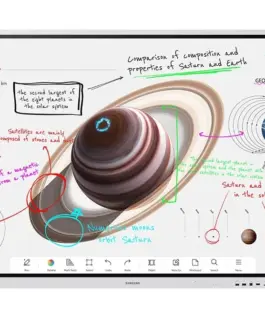
Do more than just write and draw. The expandable EZWrite workspace provides unlimited possibilities with a rich set of teaching tools and helpful AI features.
Use your own files
Import various lesson files, use their content on the board, and then export the session as an editable file for future classes.
A tool for every lesson
Take advantage of EZWrites built-in tools designed to engage students and support learning across a wide range of subjects and classroom activities.
Take lessons to the cloud
Extend the board so others can participate and interact, whether they are in the classroom or at home.
Essential tools for every teacher
With the RE04 board, your teaching experience becomes simpler because everything you need is available in one place.
Your own space and data
All accounts are secure and separate, allowing you to have your own learning space while preventing others from accessing your data.
Get organized with ease
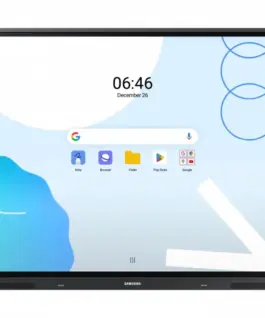
Save time by having all your most-used apps, files, and widgets organized and accessible directly from the home screen.
Press. Record. Write.
The Floating Tool allows you to take screenshots, record the screen, and annotate any app, file, website, or video displayed on the board.
Sidebar access
Expand the sidebar for convenient access to recent apps, files, input sources, and a shortcut to the home screen.
Enhanced search
Use the BenQ search tool to quickly find related online content or sort lesson files stored on the board or in the cloud.
Enhance your lesson
Increase teaching effectiveness with multi-window mode, which allows you to use the whiteboard while simultaneously using other apps. Available in Q3.
5-in-1 connectivity
The multifunctional USB-C port enables fast data transfer, clear audio/video output, touch control, and 65 W charging.
Full, vibrant sound
Enjoy enhanced sound quality with built-in 20-watt speakers that deliver clear, room-filling audio.
Everything on board
The large interactive BenQ Board Essential screen is designed for full-class participation, increasing engagement and making lessons more dynamic.
Everyone can share
InstaShare 2 lets anyone freely share ideas. Wirelessly cast lesson content and interact from any device anywhere in the room.
More than screen sharing
Go beyond simple screen mirroring. Media sharing makes lessons more dynamicshare photos, videos, or even live camera feeds directly to the board.
Tap and share
Share your screen from an Android phone with a single tap. Simply place your phone on the boards NFC sensor and start sharing instantly.
Manage the session
Host controls allow efficient session management. Accept or deny sharing requests, show or hide screens, while AI Guardian automatically blocks nudity.
Effortless management
BenQ simplifies device and user list management, greatly reducing IT workload and freeing staff for other tasks.
Seamless user list sync
Simplify identity management by syncing any existing user directory based on Google Workspace, Entra ID (formerly Azure Active Directory), ClassLink, LDAP, or SAML.
Centralized management
Remotely manage all BenQ devices with an all-in-one console that lets you install, update, and remove apps, push firmware updates, and automate tasks such as power on/off.
Enhanced data security
Protect your data with secure login options, RE04 access controls, regular system updates, and built-in Google Play Protect and Safe Browsing.
Data-driven performance
Generate detailed and comprehensive device analytics to monitor how your boards are used and optimize usage guidelines for maximum efficiency.
School-wide announcements
With X-Sign Broadcast, you can send timely announcements to all BenQ displays. Keep your school informed about upcoming events, important reminders, and emergencies.
Where health meets learning
ClassroomCare features play a key role in creating healthier learning spaces for students and teachers.
Easy on the eyes
Eye-care technologies such as the RE04 blue light filter and flicker-free screen reduce eye strain during lessons, while the 4K anti-glare display ensures clear visibility every time.
IP5X dust protection
The RE04 display meets IEC 60529 standards, preventing dust buildup even in heavily dust-prone environments.
Find the perfect BenQ interactive display
Make teaching more engaging with the ideal interactive board. Our detailed comparison table makes choosing simpledownload it now to see the best options side by side!
2,838.00 € с ДДС / 5,550.65 лв.
Времето за доставка не е определено
Налично за предварителни продажби
Benq Monitor interaktywny 86 инча RE8604 NEW 128 1200:1/touch/HDMI
Описание:
BenQ Board
The essence of education
Get all the essential tools you need to deliver effective interactive lessons.
Harness the power of Google
The EDLA-certified BenQ display combines Google services with reliable BenQ hardware and software.
Direct file access
Google Drive integration allows you to access and save files directly to the cloud from the display.
Built-in protection
Protect your boards from security and privacy threats with Google Play Protect and Safe Browsing.
A board like no other
Do more than just write and draw. The expandable EZWrite workspace provides unlimited possibilities with a rich set of teaching tools and helpful AI features.
Use your own files
Import various lesson files, use their content on the board, and then export the session as an editable file for future classes.
A tool for every lesson
Take advantage of EZWrites built-in tools designed to engage students and support learning across a wide range of subjects and classroom activities.
Take lessons to the cloud
Extend the board so others can participate and interact, whether they are in the classroom or at home.
Essential tools for every teacher
With the RE04 board, your teaching experience becomes simpler because everything you need is available in one place.
Your own space and data
All accounts are secure and separate, allowing you to have your own learning space while preventing others from accessing your data.
Get organized with ease
Save time by having all your most-used apps, files, and widgets organized and accessible directly from the home screen.
Press. Record. Write.
The Floating Tool allows you to take screenshots, record the screen, and annotate any app, file, website, or video displayed on the board.
Sidebar access
Expand the sidebar for convenient access to recent apps, files, input sources, and a shortcut to the home screen.
Enhanced search
Use the BenQ search tool to quickly find related online content or sort lesson files stored on the board or in the cloud.
Enhance your lesson
Increase teaching effectiveness with multi-window mode, which allows you to use the whiteboard while simultaneously using other apps. Available in Q3.
5-in-1 connectivity
The multifunctional USB-C port enables fast data transfer, clear audio/video output, touch control, and 65 W charging.
Full, vibrant sound
Enjoy enhanced sound quality with built-in 20-watt speakers that deliver clear, room-filling audio.
Everything on board
The large interactive BenQ Board Essential screen is designed for full-class participation, increasing engagement and making lessons more dynamic.
Everyone can share
InstaShare 2 lets anyone freely share ideas. Wirelessly cast lesson content and interact from any device anywhere in the room.
More than screen sharing
Go beyond simple screen mirroring. Media sharing makes lessons more dynamicshare photos, videos, or even live camera feeds directly to the board.
Tap and share
Share your screen from an Android phone with a single tap. Simply place your phone on the boards NFC sensor and start sharing instantly.
Manage the session
Host controls allow efficient session management. Accept or deny sharing requests, show or hide screens, while AI Guardian automatically blocks nudity.
Effortless management
BenQ simplifies device and user list management, greatly reducing IT workload and freeing staff for other tasks.
Seamless user list sync
Simplify identity management by syncing any existing user directory based on Google Workspace, Entra ID (formerly Azure Active Directory), ClassLink, LDAP, or SAML.
Centralized management
Remotely manage all BenQ devices with an all-in-one console that lets you install, update, and remove apps, push firmware updates, and automate tasks such as power on/off.
Enhanced data security
Protect your data with secure login options, RE04 access controls, regular system updates, and built-in Google Play Protect and Safe Browsing.
Data-driven performance
Generate detailed and comprehensive device analytics to monitor how your boards are used and optimize usage guidelines for maximum efficiency.
School-wide announcements
With X-Sign Broadcast, you can send timely announcements to all BenQ displays. Keep your school informed about upcoming events, important reminders, and emergencies.
Where health meets learning
ClassroomCare features play a key role in creating healthier learning spaces for students and teachers.
Easy on the eyes
Eye-care technologies such as the RE04 blue light filter and flicker-free screen reduce eye strain during lessons, while the 4K anti-glare display ensures clear visibility every time.
IP5X dust protection
The RE04 display meets IEC 60529 standards, preventing dust buildup even in heavily dust-prone environments.
Find the perfect BenQ interactive display
Make teaching more engaging with the ideal interactive board. Our detailed comparison table makes choosing simpledownload it now to see the best options side by side!
Свързани продукти